

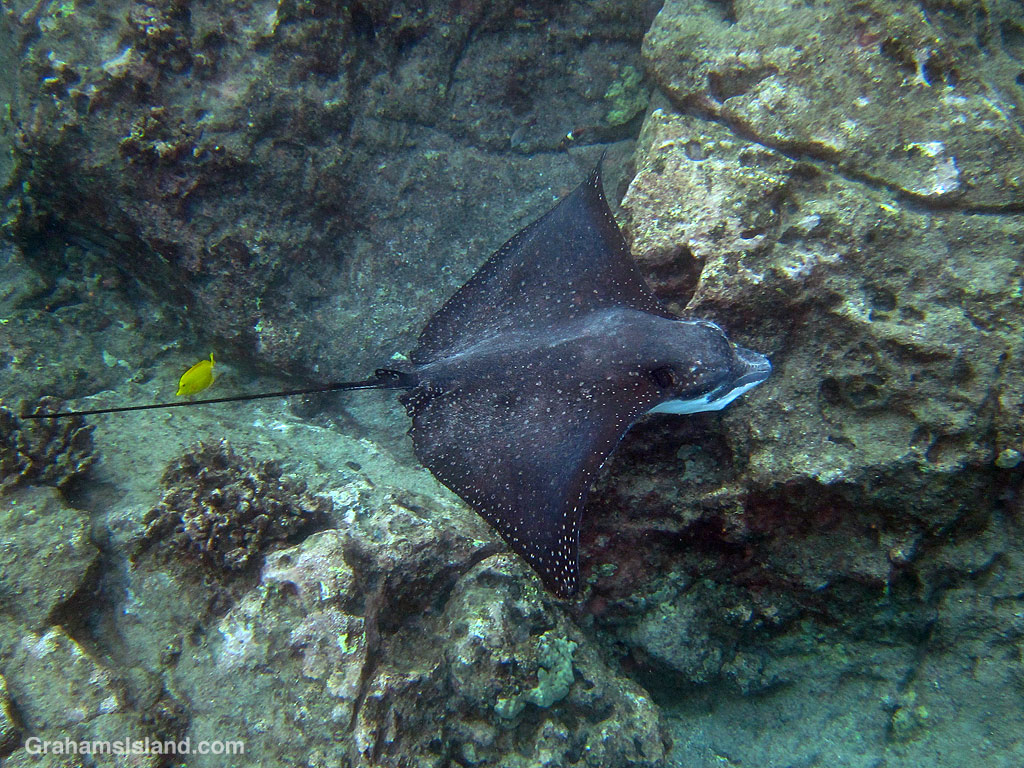
This week’s Friendly Friday challenge theme is ‘Two Ways,’ the idea being to show a photo processed in different ways or to show two photos of the same thing taken at different times in different conditions. (See more responses here.)
I’ve gone with a photo taken yesterday morning showing it before and after processing. In the water, I use a basic point-and-shoot camera in a waterproof case. I don’t use lights or a flash so I shoot mainly on auto, because if my big fingers started pushing little buttons, my subject would be halfway to Japan before I got a photo. This approach can lead to some erratic results, including the image appearing somewhat murky, but usually this can be cleaned up during processing. On this day, the visibility in the water was cloudy, but not as bad as it looks in the before photo.
For photo processing, I use an older version of Photoshop Express (PE), which is a stripped-down version of Photoshop. Using the full version would be like me driving a Ferrari to the local store – way more power and features than I need. My version of PE has a ‘haze reduction’ feature, which is a sort of automatic one-stop processing step, but I prefer to do my own adjustments.
While the two versions look quite a bit different, the change is mainly down to simple adjustments in ‘shadows and highlights’ and tweaking the tones and colors in ‘levels.’ Besides that, I removed a few of the little red flares that often occur in these underwater images, and bumped up the sharpness a hair. That’s it.
Since I follow the same routine when processing all my photos, it goes very quickly. This one was all done in 5 minutes, and the result was worth it.
 Graham's Island
Those tweaks make an enormous difference and the comparison of before and after puts the slider to good use. It is interesting seeing the ray from this angle too.
LikeLiked by 1 person
The visibility wasn’t that great and the only reason that this photo was salvageable is because the ray passed very close below as I took this shot.
LikeLiked by 1 person
I really like the way you’ve bothered to edit this photo to bring out all the details of the ray for us. I guess some people would just put up with the murky original but you’ve shown what a small investment of time can do for an image!
LikeLiked by 1 person
I think it’s just a quirk of my camera in certain conditions. Most of the difference in that image comes from changing the ‘lighten shadows’ value from 0 to 1!
LikeLiked by 1 person
Yes indeed your tweeks are a wonderful addition to the photo which adds clarity to the photo. The slider works perfectly in this scenario like peeling back a curtain of fog to reveal something beautiful. Well done, Graham.
LikeLiked by 2 people
Well put. That’s exactly what it looks like.
LikeLiked by 1 person